How to Check LESCO Bill Paid or Not
Electricity bills are an essential part of every household in Pakistan, especially for those using LESCO services. Many users often face confusion about whether their bill is paid or still pending. If you are searching for how to check LESCO bill paid or not, you are in the right place.
You will learn simple and effective methods for LESCO bill payment check online, verification methods, common issues, and expert tips to stay updated.
How to Check If Your LESCO Bill Is Paid or Not Online
The easiest way to check LESCO bill payment status is through online methods. These methods are quick, reliable, and accessible from anywhere in Pakistan.
Method 1: Check LESCO Bill Payment Status via Reference Number
This is the most common and effective method.
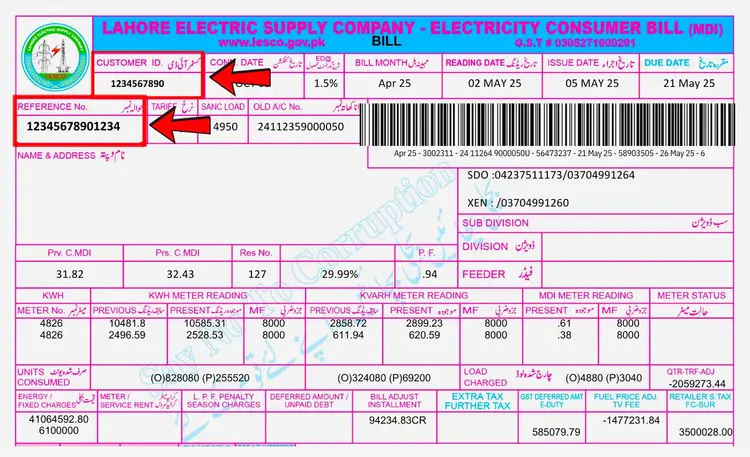
Every LESCO bill has a unique 14-digit reference number. You can use it for lesco bill payment status check by reference number.
Steps:
- Open any LESCO online bill check website
- Enter your 14-digit reference number
- Click on “Check Bill”
- View your bill details
If your bill is paid, it will show:
- Paid status
- Payment date
- Receipt details
If unpaid, it will show:
- Due amount
- Due date
Also Check:
LESCO Load Shedding Schedule
Method 2: Verify Bill Payment Through Bank or App
If you paid your bill via bank or mobile app, you can confirm payment there.
Common options:
- Mobile banking apps
- Internet banking
- Easypaisa / JazzCash
How to verify:
- Open your app
- Go to transaction history
- Find your electricity bill payment
- Check status (Successful / Pending)
If payment is successful but not updated online, wait a few hours.
Method 3: Check LESCO Bill Status via SMS (If Available)
In some cases, SMS services may be available.
You can:
- Send your reference number
- Receive bill status
However, this method is not always active, so online checking is more reliable.
How to Check LESCO Duplicate Bill and Payment Status
Sometimes you may lose your original bill. In that case, you can check your LESCO duplicate bill online.
Steps:
- Visit a bill checking platform
- Enter your reference number
- Download duplicate bill
- Check payment status
Duplicate bills also show whether your bill is paid or unpaid.
Why It’s Important to Check LESCO Bill Payment Status?
Checking your LESCO bill payment status is very important for several reasons. Many users assume that once they pay their bill, the process is complete—but that’s not always true.
Here’s why you should always verify:
- Avoid late payment penalties
- Prevent electricity disconnection
- Confirm successful transaction
- Maintain accurate utility bill tracking
- Keep proper bill payment proof
Sometimes, due to system delays or bank errors, your payment may not be updated immediately. That’s why doing a LESCO bill status check ensures peace of mind
What Information You Need to Check Bill Status
To perform a LESCO bill payment check online, you need basic details.
Required Information:
- 14-digit reference number
- Internet connection
- Access to bill checking platform
Optional:
- CNIC (in some cases)
- Customer ID
The reference number is the most important element for bill confirmation process.
Difference Between Paid and Unpaid LESCO Bill
Understanding the difference helps in proper electricity bill status tracking.
Paid Bill:
- Shows payment confirmation
- Includes payment date
- No dues remaining
Unpaid Bill:
- Shows full amount due
- Displays due date
- Risk of late fee
Also Read:
How to Transfer Your LESCO
How to Change the Consumer Name
LESCO Unit Rates
What Happens If Your LESCO Bill Is Not Paid?
If your bill remains unpaid, several issues can occur.
Possible consequences:
- Late payment surcharge
- Electricity disconnection
- Additional reconnection charges
- Negative billing record
To avoid these problems, always do a check electricity bill payment status Pakistan regularly.
Common Issues While Checking LESCO Bill Status (And Solutions)
Sometimes users face issues while checking their bill status.
1. Payment Not Updated
Problem: Bill shows unpaid after payment
Solution: Wait 24 hours and recheck
2. Wrong Reference Number
Problem: No data found
Solution: Enter correct number
3. Website Not Loading
Problem: Server error
Solution: Try later or use another site
4. Payment Deducted but Not Confirmed
Problem: Bank delay
Solution: Contact bank support
These issues are common in online bill verification Pakistan, but they are usually temporary.
Tips to Always Stay Updated About Your Electricity Bill
To avoid confusion about lesco bill paid or not, follow these tips:
- Always save payment receipt
- Take screenshot of transaction
- Check bill status after payment
- Use reliable bill checking platforms
- Set payment reminders
Benefits of Checking LESCO Bill Online
Online bill checking has many advantages.
Key Benefits:
- Saves time
- No need to visit office
- Instant bill status
- Easy access anytime
- Better financial management
It also supports:
online bill payment Pakistan
Final Words
Checking your LESCO bill paid or not is a simple but important step for every electricity user in Pakistan. With the help of online tools, you can easily perform a lesco bill payment check online and confirm your payment status within seconds.
Always use your reference number, verify transactions, and keep your payment records safe. This will help you avoid penalties, disconnections, and confusion.
By following this guide, you can confidently manage your electricity bills and stay updated at all times.
Frequently Asked Questions (FAQs)
How can I check if my LESCO bill is paid?
You can check your bill by entering your reference number on an online bill checking platform. It will show whether your bill is paid or unpaid.
Can I check LESCO bill payment without reference number?
No, the reference number is required for accurate results. Without it, lesco bill status check is not possible.
How long does it take to update bill payment status?
Usually, it updates within a few hours. In some cases, it may take up to 24 hours.
What should I do if my bill shows unpaid after payment?
Wait for some time and check again. If the issue remains, contact your bank or payment service provider.