How to Pay LESCO Bill via JazzCash
In today’s fast-paced world, paying bills has become easier than ever. With the increasing reliance on mobile payment systems, platforms like JazzCash have revolutionized how we handle our utility payments. Paying your LESCO bill (Lahore Electric Supply Company) through JazzCash offers a convenient, secure, and quick way to clear your dues without having to leave your home or stand in long queues. Whether you’re in Lahore or any other part of Pakistan, using JazzCash to pay your LESCO bill ensures that you can make payments anytime, anywhere.
If you haven’t tried paying your LESCO bill via JazzCash yet, you’re in the right place. In this guide, we will walk you through 8 simple steps to pay your LESCO bill via JazzCash. So, let’s get started!
Here Are 8 Steps to Pay Your Bill via JazzCash:
Step 1: Download the JazzCash App
The first step to paying your LESCO bill via JazzCash is downloading the JazzCash app. The app is available for both Android and iOS devices, ensuring that whether you’re using a smartphone from Android or Apple, you can easily get started.
- For Android users: Go to the Google Play Store, search for JazzCash, and hit Install.
- For iOS users: Open the App Store, search for JazzCash, and tap Get to download the app.
Once the app is installed, proceed to the next step to log in and start your payment process.
Step 2: Log In to Your JazzCash Account
After downloading the JazzCash app, you will need to log in to your account. If you don’t have an account yet, you can easily create one by following the on-screen instructions. For existing users, simply enter your JazzCash credentials to log in.
- If you are a first-time user, the app will prompt you to sign up by entering your mobile number, CNIC, and PIN to create your account.
- Once your account is set up, you can log in anytime to access various bill payment options, including LESCO.
Step 3: Select the ‘Bill Payment’ Option
Once you’re logged in, you will see a dashboard with various options. Look for the “Bill Payment” option. This is the section where you can pay electricity bills, water bills, and other utilities.
- Tap on the “Bill Payment” icon, which will lead you to a list of all available billers for payments, including LESCO.
Step 4: Choose LESCO from the Bill Payment Categories
In this step, you’ll need to select LESCO as the biller from the list of available options.
- Scroll through the biller options until you find LESCO.
- Once selected, the app will prompt you to enter your bill reference number (the 14-digit code found on your LESCO bill).
If you can’t find LESCO, make sure your app is updated to the latest version.
Step 5: Enter Your LESCO Bill Reference Number
Now, it’s time to input the 14-digit reference number from your LESCO bill. This number is unique to your account and helps the system identify your exact bill.
- Double-check your reference number before entering it to avoid errors.
- If you are unsure where to find the reference number, it is usually located on the top right section of your bill.
Once you’ve entered the correct number, tap on the “Next” button.
Step 6: Confirm Your Bill Details
At this stage, you will be shown the details of your LESCO bill, including the total amount due.
- Take a moment to review the bill to ensure everything is correct.
- If you notice any discrepancies, it’s always a good idea to double-check the reference number or contact LESCO customer care.
Once you confirm the details, proceed to the next step to choose your payment method.
Step 7: Select Your Payment Method (JazzCash Balance or Credit/Debit Card)
JazzCash provides multiple ways to pay your LESCO bill, ensuring you can use your preferred payment method.
- If you have sufficient funds in your JazzCash balance, the amount will be deducted directly.
- If you prefer to pay using your credit/debit card, you can link your card to your JazzCash account and complete the transaction through the app.
Choose the method that best suits your needs and proceed.
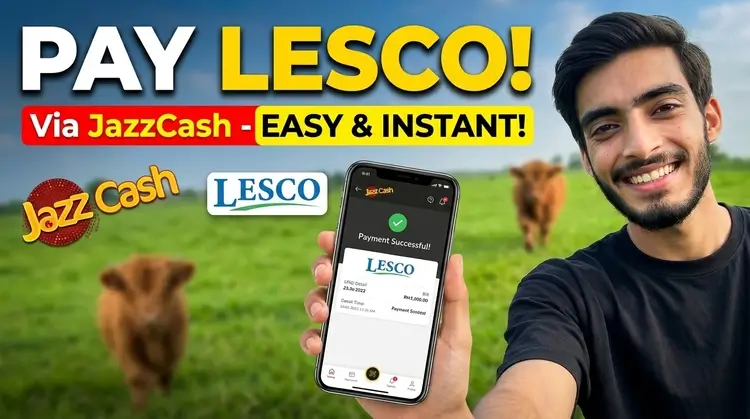
Step 8: Complete the Payment
Once you’ve selected your payment method, you’ll be asked to confirm and authorize the payment. If you’re paying via JazzCash balance, the app will directly deduct the bill amount from your balance. If using a credit/debit card, you will need to enter your card details and confirm the payment.
After successful payment, you’ll receive a confirmation notification on your screen along with a receipt. The payment will also reflect on your LESCO account.
Step 9: Save Your Payment Receipt
Always save or screenshot your payment receipt after completing your transaction. This receipt acts as proof of payment and can be useful in case of any disputes or if you need to check the payment status in the future.
Troubleshooting: Common Issues and How to Resolve Them
While paying your LESCO bill via JazzCash, you may encounter some issues. Here are a few common problems and solutions:
- Payment Failed or Declined: Make sure your JazzCash account has sufficient balance or that your credit/debit card details are correctly linked to your account. If the issue persists, try restarting the app or contacting JazzCash support.
- Incorrect Reference Number: Double-check the 14-digit reference number on your LESCO bill. If you’ve entered the wrong number, the system won’t recognize your bill.
- App Crashes or Slow Performance: Ensure that you are using the latest version of the JazzCash app. Update it through the Google Play Store or App Store if necessary.
Benefits of Paying Your LESCO Bill via JazzCash
There are several advantages to paying your LESCO bill via JazzCash:
- Convenience: Pay your bill anytime and anywhere, without the need to visit the bank or LESCO office.
- Quick Transactions: Payments are processed instantly, and you’ll receive immediate confirmation.
- Secure Payment: JazzCash offers a secure payment gateway, protecting your personal and financial information.
- 24/7 Availability: Pay your bill at any time of the day, even on weekends or public holidays.
- Multiple Payment Methods: Use JazzCash balance or credit/debit cards for flexible payments.
FAQs: Everything You Need to Know About Paying LESCO Bills via JazzCash
Q1: Is it safe to pay my LESCO bill via JazzCash?
Yes, JazzCash is a secure platform for making utility payments, including your LESCO bill. It uses encryption and other security measures to protect your financial information.
Q2: Can I pay my LESCO bill via JazzCash if I don’t have a bank account?
Yes, you don’t need a bank account to use JazzCash. As long as you have a JazzCash wallet, you can pay your LESCO bill directly from your balance.
Q3: How can I check my payment status?
Once your payment is successfully processed, you will receive a receipt and a notification. You can also check the status in your JazzCash transaction history.
Q4: Can I pay the LESCO bill of someone else using JazzCash?
Yes, you can pay the LESCO bill for someone else by entering their reference number during the payment process.